The Best Ways to Place a 50 Inch TV in Living Room
Placing a 50 inch tv in living room the right way transforms your entire entertainment setup. You will learn the ideal seating distance, mounting height, and layout tips that match your room size and furniture arrangement. Whether you prefer a wall mount or a tv console, this guide covers every scenario. We also share quick fixes for common problems like glare and poor viewing angles. Follow our advice to create a comfortable, stylish, and cinema-like experience at home.
Key Takeaways
- Ideal viewing distance: Sit 6 to 8 feet from a 50 inch tv in living room for the best picture quality and eye comfort.
- Mounting height matters: The center of your screen should sit at eye level when seated, roughly 42 inches from the floor.
- Choose the right placement: Wall mount, tv console, or corner placement all work depending on your living room layout.
- Reduce glare: Position your tv away from windows and use matte screen protectors to avoid reflections.
- Consider room design: Your tv placement should complement furniture arrangement, lighting, and overall living room decor.
- Cable management: Plan cable routes early to keep your setup clean and safe.
📑 Table of Contents
- Why Your 50 Inch TV Placement in the Living Room Makes All the Difference
- Finding the Perfect Seating Distance for a 50 Inch TV in Living Room
- Best Height and Eye-Level Positioning for Your TV
- Wall Mount vs. TV Stand: Which Placement Works Best?
- Living Room Layout Ideas for a 50 Inch TV Setup
- Reducing Glare and Improving Picture Quality
- Common Mistakes to Avoid When Placing Your TV
- Expert Tips for a Stylish and Functional TV Setup
- Final Thoughts on Placing Your 50 Inch TV in Living Room
Why Your 50 Inch TV Placement in the Living Room Makes All the Difference
A 50 inch tv in living room setup can feel like a small home theater. But the magic only happens when you place it correctly. Many people hang their tv too high, sit too close, or pick a spot that catches every glare. These small mistakes add up fast. They ruin movie nights and cause eye strain over time.
The good news is that getting it right is simpler than you think. A few measurements and a bit of planning go a long way. Whether your living room is small or spacious, this guide helps you find the sweet spot. You will learn how to position your 50 inch television for comfort, style, and the best picture quality every single day.
Think of this as your step-by-step playbook. We cover height, distance, furniture choices, and common pitfalls. By the end, you will feel confident about your setup. No guesswork. No wasted trips to the store. Just clear, practical advice you can use right away.
Finding the Perfect Seating Distance for a 50 Inch TV in Living Room
Why Distance Changes Everything
Seating distance is the first thing to get right. Sit too close and the screen feels overwhelming. Sit too far and you miss the details. The sweet spot depends on your tv resolution and room size.
For a 50 inch tv in living room, the general rule is to sit between 6 and 8 feet away. This range works well for most modern 4K TVs. At this distance, your eyes take in the full picture without straining. You see rich detail without feeling like you are inside the screen.
Quick Distance Guide Based on Resolution
- 4K TV: 6 to 8 feet is ideal for sharp, immersive viewing.
- 1080p TV: Stay around 7 to 9 feet to avoid seeing individual pixels.
- 8K TV: You can sit a bit closer, around 5 to 7 feet.
How to Measure Your Room
Grab a tape measure and check the distance from your couch or favorite chair to the wall. Mark that spot. Then test with a temporary stand or ask a friend to hold the tv at that distance. Sit down and watch a scene with lots of movement. If it feels natural and comfortable, you found your spot.
Best Height and Eye-Level Positioning for Your TV
The Golden Rule: Center at Eye Level
Your tv should feel like it floats in the room. The center of the screen should sit at about 42 inches from the floor. This matches the average seated eye level. When you look straight ahead, the middle of the screen lines up perfectly with your gaze.
Many people make the mistake of mounting their tv too high. They think higher means more visible. But a 50 inch tv in living room mounted too high forces you to tilt your head up. That causes neck pain after just one movie. Avoid this by keeping the screen centered at the right height.
Wall Mount vs. TV Stand Height
A wall mount lets you control the height exactly. You can adjust the bracket before you drill. A tv stand, on the other hand, limits your options. Most stands place the screen between 36 and 48 inches from the floor. Check your stand specs before buying.
Quick Tips for Perfect Height
- Use a laser level to mark the center point on the wall.
- Have someone hold the tv at the marked height while you check from your couch.
- Remember: the center of the screen, not the top, should be at eye level.
Wall Mount vs. TV Stand: Which Placement Works Best?
Wall Mount Benefits
A wall mount saves floor space and gives a clean, modern look. It works great in smaller living rooms where every inch counts. You can angle the tv downward for a better viewing experience. Wall mounts also make it easy to hide cables behind the wall.
For a 50 inch tv in living room, a sturdy wall mount rated for at least 50 pounds is essential. Check the VESA pattern on your tv before buying a bracket. Most 50 inch models use a standard 300×300 or 400×400 mounting pattern.
TV Stand Benefits
A tv stand offers flexibility. You can move it around if you rearrange your furniture. Stands often come with shelves for soundbars, gaming consoles, and streaming devices. They also add a warm, furniture-like feel to the room.
The downside is that stands take up more space. In a cozy living room layout, a bulky stand can make the room feel cramped. Choose a slim, low-profile stand if space is limited.
Comparison Table
- Wall Mount: Saves space, clean look, fixed position, requires wall installation.
- TV Stand: Flexible placement, extra storage, takes up floor space, easy to move.
Living Room Layout Ideas for a 50 Inch TV Setup
Center the TV on the Main Wall
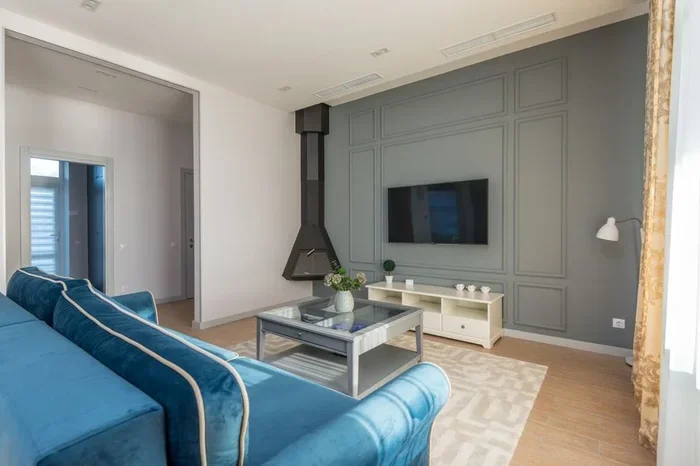
The most common setup places the tv on the wall opposite your seating area. This creates a natural focal point. It also keeps the viewing angle balanced for everyone on the couch. If your living room has a fireplace, you can mount the tv above or beside it.
Corner Placement for Small Rooms
In a smaller living room layout, corner placement can work surprisingly well. Mount the tv on the wall that faces your main seating area. Angle it slightly toward the center of the room. This keeps the screen visible from multiple seats without taking up wall space in the middle.
TV Above the Fireplace
Placing a 50 inch television above a fireplace is a popular choice. But watch the height. Fireplaces push heat upward, which can affect your tv over time. Keep the tv mounted high enough to stay above the heat zone. Also, the mantelpiece can block the bottom of the screen for shorter viewers.
L-Shaped Seating Arrangement
If your living room has an L-shaped sofa, try placing the tv on the short wall. This keeps everyone in the seating area within a good viewing angle. Avoid putting the tv on the long wall, as viewers at the far end will sit at an awkward angle.
Reducing Glare and Improving Picture Quality
Position Away from Windows
Natural light is the biggest enemy of tv picture quality. Place your tv on a wall that does not face windows. If that is not possible, use blackout curtains or blinds to control the light during viewing hours.
Matte Screen Protectors
A matte screen protector reduces glare significantly. It diffuses light reflections and makes the picture easier to see in bright rooms. This is a simple and affordable fix for any 50 inch tv in living room setup.
Anti-Reflective Coatings
Some tv models come with anti-reflective screen coatings. When shopping, look for this feature. It makes a noticeable difference in rooms with lots of natural light or overhead lighting.
Common Mistakes to Avoid When Placing Your TV
Even with the best intentions, people make mistakes. Here are the most common ones and how to avoid them.
- Mounting too high: This causes neck strain. Always check the center screen height from your seated position.
- Ignoring cable management: Exposed cables look messy and can be a safety hazard. Use cable covers or run cables inside the wall.
- Placing the tv too close to the corner: This limits the viewing angle. Keep at least 12 inches from the side walls.
- Forgetting about sound: A wall mount can block the tv speakers. Consider a soundbar or external speakers for better audio.
- Not testing before drilling: Always do a dry run with cardboard cut to tv size before making holes in your wall.
Expert Tips for a Stylish and Functional TV Setup
Match Your TV to Your Living Room Decor
Your tv should blend with the room, not clash with it. Choose a wall color that does not reflect too much light. Consider a floating shelf or a minimalist tv console to frame the screen. These small touches elevate the whole look of your living room design.
Use a Swivel Mount for Flexibility
A swivel wall mount lets you turn the tv toward different seating areas. This is perfect for open-plan living spaces. You can watch from the couch, the dining area, or even the kitchen. Just make sure the mount supports the weight of your 50 inch television safely.
Plan for Future Upgrades
Think ahead. If you plan to add a soundbar, streaming box, or gaming console, leave room for them. Choose a tv stand or wall setup with enough space. Good planning now saves you headaches later.
Final Thoughts on Placing Your 50 Inch TV in Living Room
Getting the placement right for your 50 inch tv in living room is worth the effort. You enjoy sharper images, fewer headaches, and a setup that looks great every day. Start with the seating distance and eye-level height. Then choose between a wall mount and a tv stand based on your room size and style. Take your time with the layout. Test different positions before making any permanent changes.
Remember the small details too. Reduce glare, manage cables, and match your setup to the room decor. These touches make a huge difference in how your space feels and functions. With the tips in this guide, you are ready to create a living room entertainment setup that you and your family will love for years to come.
Now go measure your wall, grab your level, and start building the perfect setup. Your best movie nights are just a few steps away.
Frequently Asked Questions
What is the ideal seating distance for a 50 inch TV?
For a 50 inch tv in living room, sit between 6 and 8 feet away. This range works best for 4K TVs and gives you a comfortable, immersive viewing experience without eye strain.
Should I mount my 50 inch TV above the fireplace?
You can, but be careful about heat. Keep the tv high enough to avoid exposure to fireplace heat. Also, the mantel may block the bottom of the screen for shorter viewers, so measure carefully before mounting.
What height should I mount a 50 inch TV?
The center of the screen should sit at about 42 inches from the floor. This matches the average seated eye level and provides the most comfortable viewing angle for everyone in the room.
Can I place my TV in a corner of the living room?
Yes, corner placement works well in small rooms. Just angle the tv slightly toward the main seating area. Make sure the viewing angle stays comfortable from all seats in the living room layout.
How do I reduce glare on my TV screen?
Position the tv away from windows and bright lights. Use a matte screen protector or blackout curtains. A tv with an anti-reflective coating also helps significantly in bright living room settings.
Do I need a special wall mount for a 50 inch TV?
Yes, use a wall mount rated for at least 50 pounds. Check the VESA mounting pattern on your tv before buying a bracket. A tilting or swivel mount adds extra flexibility for finding the perfect viewing angle.
=== SEO TITLE ===
The Best Ways to Place a 50 Inch TV in Living Room
=== META TITLE ===
Best Ways to Place a 50 Inch TV in Living Room (2024 Guide)
=== URL SLUG ===
best-ways-to-place-50-inch-tv-living-room